

AI-Powered Invoice Automation: How Businesses Can Reduce Manual Invoice Processing
Invoice processing is one of those business tasks that quietly consumes a lot of time.
Someone receives an invoice, opens it, reads the information, enters the details into a finance system, finds the correct supplier, checks the numbers, sends it for approval and updates the records.
When a business processes hundreds or thousands of invoices, these repetitive steps can create a significant administrative workload.
AI invoice automation can help reduce some of this manual work.
But it works best when AI is treated as one part of the process, rather than as a replacement for the finance system or the people responsible for financial decisions.
A practical invoice automation system combines three things:
AI for reading and understanding documents.
Traditional software for calculations, validation and business rules.
People for approvals, exceptions and important decisions.
This guide explains how those pieces can work together.
What Does Invoice Automation Actually Mean?
Invoice automation means reducing the manual steps between receiving an invoice and recording it in the finance or ERP system.
Instead of a person manually handling every step, software can assist with reading, extracting, matching, checking and routing information.
However, invoice automation does not mean everything should be controlled by AI.
A well-designed system normally combines AI, traditional automation and the existing finance system.
The important part is deciding which technology should handle each task.
The Traditional Invoice Processing Workflow
In many businesses, invoice processing still looks something like this:
Invoice Received → Employee Opens Invoice → Reads Information → Enters Data → Finds Supplier → Checks Information → Routes for Approval → Finance System Updated
Several steps involve someone manually reading information and entering it into another system.
As invoice volume grows, the amount of administrative work grows with it.
What Does an AI-Assisted Invoice Workflow Look Like?
An AI-assisted process can keep the same starting and ending points while changing what happens in the middle.
For example:
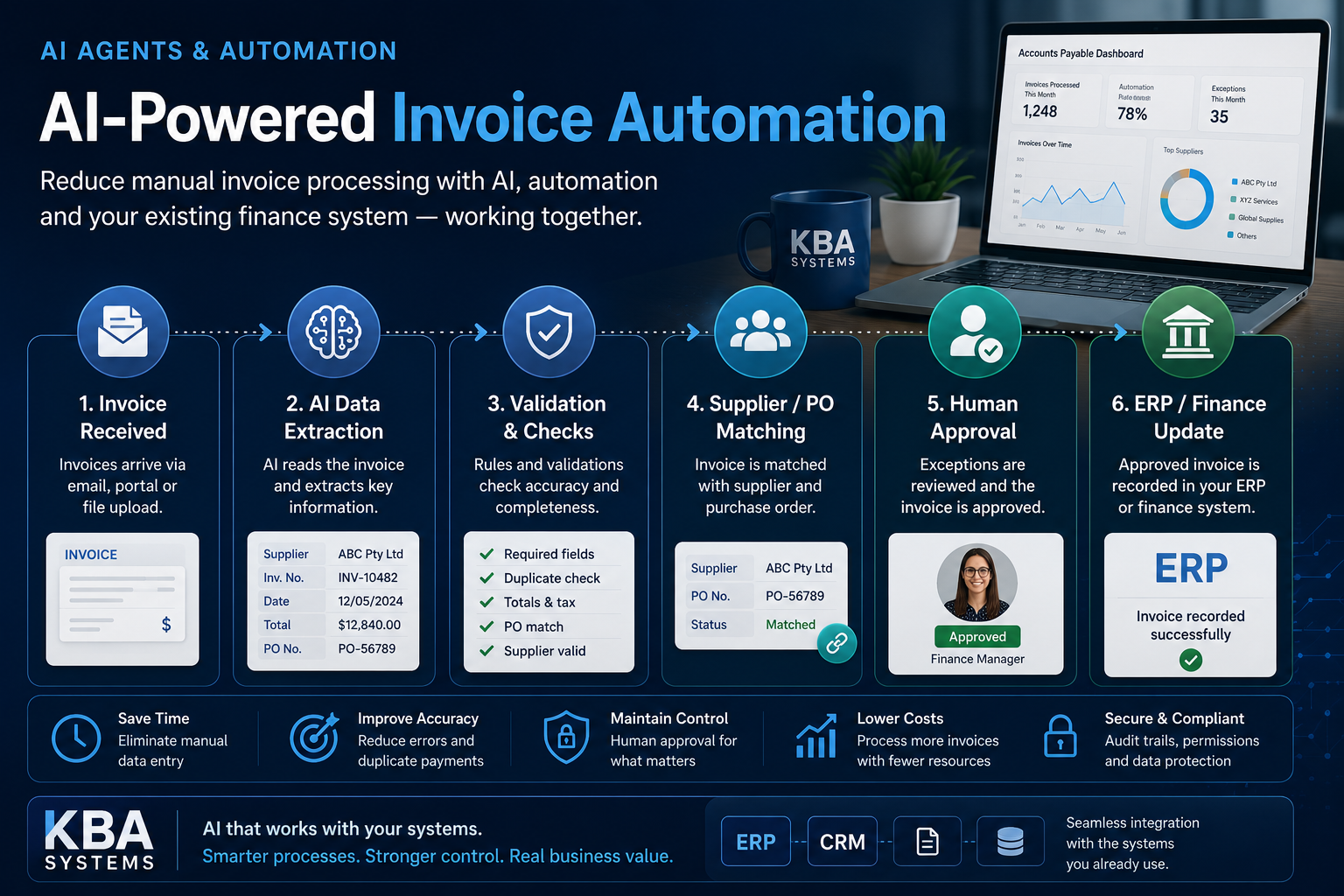
Invoice Received → Document Processing → Data Extraction → Supplier Matching → Validation Rules → Exception Detection → Human Approval → Finance/ERP Update
AI can help with reading and understanding the invoice.
Traditional software can perform predictable checks.
People remain responsible for approvals and unusual situations.
This distinction is important.
The goal isn't to let AI control the finance process.
The goal is to reduce repetitive manual work while keeping important financial controls in place.
Traditional OCR vs AI-Assisted Document Processing
OCR, or Optical Character Recognition, has been used for years to convert text in scanned documents and images into machine-readable information.
Traditional OCR can work well for structured documents, but template-based extraction approaches can become difficult to maintain when invoice layouts vary significantly.
One supplier may put the invoice number in the top-right corner. Another may place it somewhere completely different.
AI-assisted document processing can be more flexible because it can help identify information based on its context rather than relying only on its exact position on the page.
For example, the system can attempt to identify:
- Supplier name
- Invoice number
- Invoice date
- Line items
- Tax
- Total amount
- Purchase-order reference
However, AI extraction should not automatically be treated as final truth.
The extracted information should be validated before it is accepted into the finance workflow.
What Information Can AI Extract From an Invoice?
AI can help extract many of the fields finance teams normally enter manually.
These may include:
- Supplier or vendor
- Invoice number
- Invoice date
- Line items
- Tax amounts
- Total amount
- Purchase-order references
The important principle is that extraction produces a proposed interpretation of the invoice.
For example, the system may determine:
Invoice Number: INV-10482
Before that information is accepted, other software can validate it against expected formats, supplier information and business rules.
If the system is uncertain, the invoice can be sent to a person for review.
Validation: Checking the Extracted Data
Once information has been extracted, deterministic software can perform validation.
This is where traditional software is particularly important.
Validation rules might check:
- Whether required fields are present
- Whether the invoice date is valid
- Whether totals calculate correctly
- Whether tax calculations are consistent
- Whether the supplier exists
- Whether the invoice number has already been processed
These checks should not depend entirely on AI.
A useful principle is:
AI reads. Software validates. People approve.
That creates a much stronger workflow than relying on AI alone.
Matching Invoices With Suppliers and Purchase Orders
The next step is connecting the invoice with existing business records.
The system may need to identify:
- The supplier
- The relevant purchase order
- The goods or services received
- The appropriate department or project
AI can assist with identifying the likely supplier when names or document formats vary.
Traditional software can then compare the extracted information against the company's actual records.
Where the information matches correctly, the invoice can move to the next stage.
Where something doesn't match, it can be treated as an exception.
Exception Handling: What Happens When Something Doesn't Match?
Not every invoice will be straightforward.
A good invoice automation system should expect exceptions rather than pretending they won't happen.
Examples include:
- Possible duplicate invoices
- Unknown suppliers
- Missing purchase-order references
- Incorrect totals
- Missing information
- Differences between an invoice and purchase order
- Unusual values requiring review
The system shouldn't simply guess what to do.
Instead, it should identify the problem and send the invoice to the appropriate person with enough context to review it.
Good exception handling is an important part of practical invoice automation.
Human Approval Should Remain Part of the Workflow
Once an invoice has been extracted, validated and matched, it can be routed through the appropriate approval process.
Approval rules might depend on:
- Invoice amount
- Department
- Project
- Supplier
- Budget owner
- Management level
AI and automation can prepare the invoice for a decision.
They should not automatically replace the people responsible for making important financial decisions.
For example:
AI: reads the invoice.
Automation: checks the rules.
Finance system: calculates and records.
Person: approves.
This division of responsibility helps keep the process controlled.
What Should NOT Be Controlled by AI?
This is particularly important for financial systems.
Some tasks require predictable, repeatable results and should remain with deterministic software.
Financial Calculations
Totals, taxes and other important calculations should be performed and verified using reliable rule-based software.
Accounting Rules
The finance or ERP system should remain responsible for how transactions are categorised and recorded.
Payment Logic
AI should not independently decide when and how suppliers are paid.
Payments should remain subject to defined business rules and approvals.
Approval Limits
The system should enforce who can approve invoices and the financial limits of their authority.
The simple rule is:
AI can help read and organise the invoice. Your finance software should do the maths and enforce financial rules.
Connecting Invoice Automation With ERP and Accounting Software
Invoice automation becomes much more useful when it connects with the finance or ERP system a business already uses.
In many cases, this can happen through APIs or other supported integration methods.
The automation layer can potentially:
- Receive the invoice
- Extract information
- Retrieve supplier information
- Check purchase-order data
- Perform validation
- Route for approval
- Send approved information back to the finance system
This means businesses don't necessarily need to replace their accounting or ERP software to introduce AI-assisted invoice processing.
The automation can work as a controlled layer around the existing system.
Security and Data Considerations
Invoices contain sensitive financial and supplier information.
Security therefore needs to be considered from the beginning.
Least-Privilege Access
The automation should only have access to the information and system functions required for its job.
Understand Where Data Goes
If an external AI provider processes invoice information, the business should understand how that information is processed, stored and protected.
Maintain an Audit Trail
Important activities should be recorded.
For example:
- What information was extracted
- What validation was performed
- What exceptions were identified
- Who approved the invoice
- What was eventually recorded
Duplicate and Fraud Checks
The system can help flag duplicate invoices and unusual information for additional review.
Protect Against Untrusted Document Content
AI systems processing documents from external sources should treat document content as information to analyse, not as trusted instructions for the system to follow.
Why Human Review Still Matters
The purpose of invoice automation isn't necessarily to remove people from finance operations.
It is to reduce repetitive work.
Instead of spending time manually entering information from every invoice, finance employees can focus more attention on:
- Approvals
- Exceptions
- Supplier issues
- Financial controls
- Unusual transactions
As the organisation gains experience with the system and measures its performance, some routine processes may become more automated.
That should happen deliberately and based on evidence.
Common Invoice Automation Mistakes
One common mistake is expecting AI extraction to be perfect.
AI-assisted document processing can be useful, but extracted information should still be validated.
Another mistake is allowing AI to handle financial calculations that deterministic software can perform more reliably.
Businesses can also underestimate exception handling. Automating normal invoices is only part of the problem. The system also needs a clear process for invoices that don't match expected rules.
Trying to automate everything immediately can create unnecessary complexity.
It is usually better to begin with a clear and well-understood invoice workflow, test the process, measure the results and then expand.
Finally, involve the finance team early.
The people currently processing invoices understand the exceptions and practical problems better than anyone else.
How Should a Business Start With AI Invoice Automation?
Start with one specific invoice process.
Choose an area where:
- Invoice volume is meaningful
- The process is understood
- Repetitive manual work exists
- Approval rules are clear
- The required systems can be integrated
Document the current workflow.
Then identify which steps involve:
Reading → AI may help
Rules/calculations → Traditional software
System communication → APIs/integration
Important decisions → People
Build a focused first version.
Keep people involved.
Measure the results against the existing process.
Useful measurements might include:
- Processing time
- Manual touches per invoice
- Error and rework rates
- Number of exceptions
- Approval time
- Employee experience
Then decide whether expanding the automation makes business sense.
KBA Systems has practical experience building invoice-automation capabilities into business platforms.
The approach we believe makes the most sense is straightforward:
AI helps with reading and understanding.
Traditional software handles calculations and business rules.
Existing finance systems remain the system of record.
People remain responsible for important approvals and exceptions.
That balance is what turns an AI demonstration into a practical business system.
Frequently Asked Questions
What Is AI Invoice Automation?
AI invoice automation uses AI to help read invoices and extract important information while traditional software handles validation, business rules and finance-system integration.
The goal is to reduce repetitive manual processing while maintaining appropriate financial controls.
How Is AI Different From Traditional Invoice OCR?
OCR converts text from images or scanned documents into machine-readable information.
AI-assisted document processing can add another layer that helps identify information based on context, which can be useful when invoice formats vary.
Both approaches can also be used together.
What Information Can AI Extract From an Invoice?
AI can help identify information such as supplier name, invoice number, invoice date, line items, tax, totals and purchase-order references.
Extracted information should be validated before being accepted into the finance system.
Should AI Calculate Invoice Totals and Payments?
Important financial calculations, accounting rules, payment logic and approval limits should remain with deterministic finance software and established business controls.
AI can assist with reading and organising the invoice.
Does Invoice Automation Replace My Accounting System?
Usually, it doesn't need to.
Invoice automation can often integrate with an existing finance or ERP system through APIs or supported integration methods.
The automation becomes an additional processing layer rather than replacing the core finance system.
Looking to Reduce Manual Invoice Processing?
If invoice processing is taking more manual effort than it should, KBA Systems can review your existing workflow, finance-system integration and business requirements.
We can help identify where AI-assisted invoice automation could provide practical value, where traditional automation is more appropriate and where your existing finance software should remain in control.
Related Article

Stop Building Apps. Start Architecting Intelligent Systems.
Whether you need to modernize legacy infrastructure or build custom AI agents from scratch, our elite engineering pods are ready to design your competitive edge. Let’s map out your transition.
