

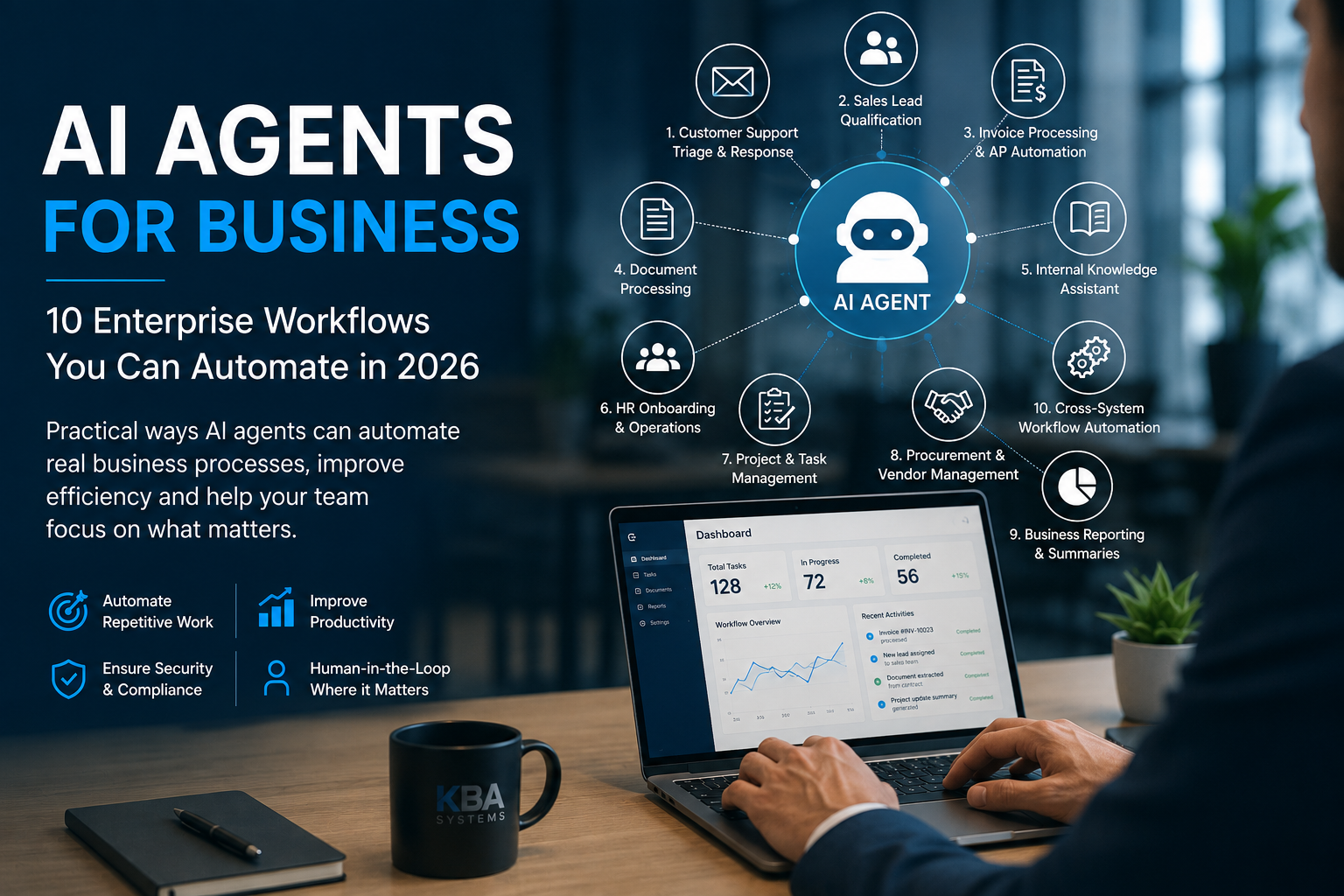
AI Agents for Business: 10 Enterprise Workflows You Can Automate in 2026
Most businesses don't need an AI agent for everything. They need to find the workflows where an agent can reduce repetitive work without adding unnecessary complexity or risk.
That distinction matters.
It is easy to start with, “We need AI agents,” and then look for somewhere to use them. A better approach is to start with a slow, repetitive or high-volume business process and ask what technology would improve it.
Sometimes the answer is an AI agent. Sometimes it is traditional automation, an API integration or simply better software.
This article explains what AI agents mean in practical business terms, 10 enterprise workflows where they can be useful in 2026, and where businesses should be careful about using them.
What Is an AI Agent in Simple Business Terms?
An AI agent is software that can work towards a defined goal, determine appropriate next steps, use approved tools or systems and complete parts of a workflow within set limits.
For example, imagine asking an agent to help follow up on unpaid invoices.
The system could identify overdue invoices, gather the relevant customer information, prepare reminder emails and place them in a queue for someone to review.
The important part is control.
A well-designed enterprise AI agent should have clear boundaries around:
- What information it can access
- Which systems it can use
- What actions it can take
- Which actions require human approval
- When it should stop and ask for help
AI agents should not have unlimited access to business systems.
AI Agent vs Chatbot vs AI Assistant vs Traditional Automation
These terms are often used interchangeably, but they are different.
A chatbot mainly communicates with users and answers questions.
An AI assistant helps a person complete work. It might summarise a document, draft an email or suggest a next step, while the person remains in control.
An AI agent can go further. Within defined permissions, it can understand a goal, determine appropriate actions, use approved tools and complete parts of a workflow.
Traditional automation follows predefined rules. If something happens, the system performs a specific action.
In real enterprise applications, the best solution may combine several of these approaches.
For example, a customer-service workflow might use traditional rules for basic routing, AI to understand the customer's request, an assistant to help employees prepare responses and controlled agent actions to update approved systems.
The goal is not to use an AI agent everywhere.
The goal is to use the right technology for each part of the process.
Why Are Businesses Interested in AI Agents in 2026?
AI models have become increasingly useful for practical business tasks such as reading documents, understanding requests written in natural language, extracting information and preparing content.
At the same time, connecting AI capabilities with existing business systems has become more practical.
An AI agent can potentially interact with an existing CRM, ERP, document system, email platform or internal application through controlled APIs and integrations.
This is important because businesses don't necessarily need to replace their existing software to start using AI.
The strongest opportunities usually involve processes with:
- High volumes of repetitive work
- Information that varies from case to case
- Multiple systems or steps
- Clear rules around what requires human approval
Here are 10 examples.
10 Enterprise Workflows That Can Use AI Agents
1. Customer Support Triage and Response
An AI agent can help read incoming customer requests, understand their intent, retrieve approved information and prepare a suggested response.
It can also help route more difficult cases to the appropriate person and provide the relevant context.
After a case has been reviewed, approved integrations can update the customer-service system.
Human involvement should remain important for sensitive situations such as complaints, refunds, account changes or unusual customer issues.
The objective isn't necessarily to remove customer-service employees.
It is to reduce the repetitive work around customer service so people can spend more time handling situations that require judgement.
2. Sales Lead Qualification and Follow-Up
Sales teams often spend significant time reviewing incoming leads, entering CRM information and preparing follow-ups.
An AI agent can assist by:
- Reviewing incoming enquiries
- Collecting missing information
- Categorising leads
- Preparing personalised follow-up drafts
- Suggesting meeting times
- Updating approved CRM fields
For important sales communication, businesses should decide where human review is required before anything is sent.
AI should support the relationship rather than replace it.
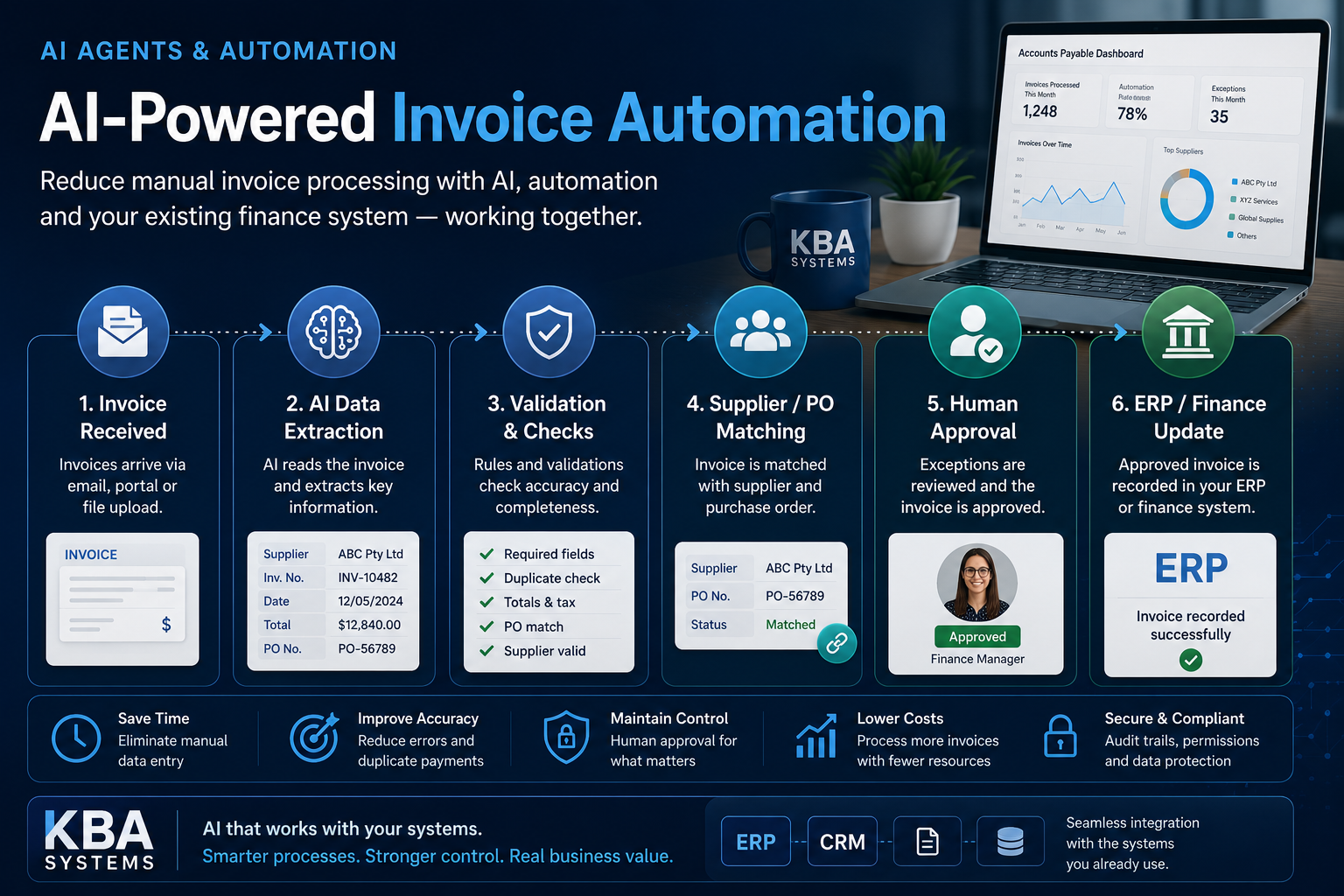
3. Invoice Processing and Accounts Payable
Invoice processing is a strong example of combining AI with traditional business automation.
A system can help:
- Read incoming invoices
- Extract important information
- Identify the supplier
- Compare information with available records
- Detect missing or unusual information
- Route invoices for approval
- Update approved finance workflows
The most reliable approach is usually not to let AI make financial decisions independently.
AI can help with reading, classification and preparation, while deterministic software handles calculations and finance staff retain approval authority.
This type of workflow is particularly relevant to KBA Systems' experience building business platforms with automated invoice-processing capabilities.
4. Document Processing and Data Extraction
Many organisations still have employees reading documents and manually entering information into business systems.
Examples include:
- Insurance documents
- Contracts
- Applications
- Forms
- Invoices
- Business records
AI can help extract information from these documents.
But extraction should not automatically mean acceptance.
A stronger architecture combines AI extraction with validation rules and human review for uncertain or high-impact information.
This combination can make document-heavy workflows more efficient without treating AI output as automatically correct.
5. Internal Knowledge Assistant
Employees often spend significant time searching through policies, manuals, project documentation and internal knowledge bases.
An AI-powered knowledge system can allow employees to ask questions in natural language and receive answers based on approved company information.
Where possible, answers should reference their sources so employees can verify important information.
Permissions are equally important.
An employee should not be able to retrieve information through an AI assistant that they would not normally have permission to access.
Internal knowledge systems are often a practical place for businesses to begin experimenting with enterprise AI because the initial system can focus primarily on finding and explaining information rather than taking important actions.
6. Employee Onboarding and HR Operations
AI agents can support routine HR administration.
For example, they can help:
- Answer common policy questions
- Collect onboarding information
- Create approved onboarding tasks
- Send reminders
- Help employees locate documents
- Guide new employees through standard processes
However, sensitive HR decisions should remain with people.
Decisions involving compensation, performance, disputes, hiring or termination should not be delegated to an AI agent without appropriate human responsibility and oversight.
AI can support the administration around these decisions rather than making the decisions itself.
7. Project and Task Management
Project managers often spend time collecting updates, checking overdue tasks and following up with team members.
An AI agent connected to approved project systems could help:
- Summarise project updates
- Identify overdue tasks
- Prepare status reports
- Suggest follow-up tasks
- Notify responsible people
- Update approved project information
The system can help organise information and reduce administrative work.
Decisions around priorities, resources, deadlines and client commitments should remain with the responsible people.
8. Procurement and Vendor Management
Procurement teams often review large amounts of vendor information and supporting documentation.
AI can help:
- Review vendor documents
- Identify missing information
- Compare available information
- Prepare summaries
- Organise records
- Route requests through approval workflows
For important purchasing decisions, AI should support the preparation process rather than independently approve significant expenditure.
9. Business Reporting and Management Summaries
Business leaders often receive information from many different systems.
An AI agent connected to approved data sources can help prepare:
- Daily operational summaries
- Project status updates
- Sales summaries
- Customer-service trends
- Management reports
- Plain-language explanations of financial information
There is an important distinction here.
Important financial figures should come from reliable, deterministic systems.
AI can help explain and summarise those figures, but it should not invent or independently calculate critical financial information that people will rely on.
10. Cross-System Workflow Automation
This may be one of the most valuable applications of AI agents.
Most business processes don't happen inside a single application.
A typical workflow may involve:
Email → CRM → ERP → Project Management → Documents → Notifications
Consider a customer emailing a company to request a project change.
A controlled AI-enabled workflow could:
- Understand the request
- Identify the relevant customer and project
- Prepare a draft task
- Notify the project manager
- Prepare a draft customer response
- Wait for approval where required
The important part is the architecture.
AI understands the request. APIs connect the systems. Business rules control the process. Humans approve important actions.
This combination can be considerably more useful than simply adding a chatbot to an existing website.
Where Should AI Agents NOT Be Used?
Understanding where not to use AI is just as important as finding good use cases.
Final Financial Calculations
Important calculations should normally be performed by deterministic software that produces predictable and auditable results.
AI can explain those numbers, but the source of truth should remain the appropriate financial system.
Unsupervised High-Value Payments
AI agents should not be given unrestricted authority to make significant payments.
Important financial actions should have appropriate approval controls.
Critical Regulatory Decisions
Processes with significant regulatory or legal consequences require appropriate accountability, validation and human oversight.
Important Employment Decisions
AI can help organise information, but significant employment decisions should remain with responsible people.
High-Impact Customer Decisions
Decisions with serious consequences for customers require appropriate controls and human responsibility.
Processes Already Solved Well With Normal Software
Not every workflow needs an AI agent.
Sometimes a normal API integration, workflow engine or simple business rule is cheaper, faster and safer.
Adding AI where it isn't needed simply introduces additional complexity.
Security and Permission Considerations
AI agents can interact with business systems, so security needs to be part of the architecture from the beginning.
Role-based permissions: Give an agent access only to the information and systems required for its specific task.
Least-privilege access: Avoid giving broad access simply because it is easier during development.
Human approval: Define which actions can happen automatically and which require approval.
Audit logs: Important actions should be recorded so organisations can understand what happened.
Sensitive information: Understand how customer, employee and financial information is processed and where it goes.
External AI providers: Businesses should understand how external providers handle information and whether their terms and architecture meet business requirements.
Prompt injection: Systems that read external emails, documents or websites need protection against malicious or misleading instructions contained in that content.
Action limits: Restrict what agents can do, particularly around financial or irreversible actions.
Monitoring: Organisations should be able to see what agents are doing.
Override and shutdown controls: There should be a clear way to stop or override an automated process.
An AI agent should never have unlimited access to enterprise systems.
Why Human-in-the-Loop Design Matters
“Human in the loop” simply means that people remain involved at important points in the process.
Good AI automation isn't necessarily about removing people.
It is about reducing repetitive work so employees can spend more time on decisions, exceptions, relationships and higher-value tasks.
A practical system might allow AI to handle routine processing, flag uncertain cases and wait for approval before important actions.
As the organisation gains experience and measures performance, some processes may become more automated.
That should happen deliberately rather than by default.
Can AI Agents Work With Existing Enterprise Software?
Yes, in many cases.
Businesses usually don't need to replace their ERP, CRM, finance software, document systems or internal applications simply because they want to introduce AI agents.
AI capabilities can often connect with existing systems through APIs and controlled integrations.
The architecture might look like:
Existing Software → API/Integration Layer → AI Capability → Business Rules → Human Approval
This allows organisations to modernise specific workflows without rebuilding everything.
For older systems without modern APIs, integration can be more difficult, but modernisation or integration may still be more practical than complete replacement.
How Should Businesses Start Implementing AI Agents?
Start with one specific problem.
Choose a workflow that is repetitive, time-consuming and understood well by the people currently doing the work.
Document how it works today.
Then ask:
- Where is the most time being spent?
- Which steps require judgement?
- Which steps follow clear rules?
- What information does the process need?
- Which systems are involved?
- What could safely be automated?
- Where should a person approve?
Build a focused first version rather than trying to automate the entire department.
Keep people involved while the system is being tested.
Measure the results.
Then decide whether expanding the automation makes business sense.
How Do You Measure Whether an AI Agent Is Useful?
Define success before development begins.
Depending on the workflow, useful measures might include:
- Time saved per case
- Reduction in repetitive manual work
- Error and rework rates
- Response time
- Cost per transaction
- Number of cases requiring human intervention
- Employee adoption
- Customer experience
If an AI agent doesn't improve something that matters, adding more AI is unlikely to solve the problem.
Sometimes an evaluation will show that traditional automation or an API integration is the better solution.
That is still a useful result.
The objective is not to deploy AI agents.
The objective is to improve the business process.
Frequently Asked Questions
What Is an AI Agent for Business?
An AI agent for business is software that can work towards a defined goal, use approved systems and complete certain actions within established limits. Human approval can remain in place for sensitive or important actions.
How Is an AI Agent Different From a Chatbot?
A chatbot mainly communicates with users and answers questions. An AI agent can potentially use approved tools and systems to complete parts of a business workflow rather than only providing a response.
What Business Processes Can AI Agents Automate?
Common opportunities include customer-service triage, document processing, invoice workflows, knowledge search, sales administration, project updates, reporting and cross-system workflow automation.
The suitability depends on the process, data, risk and existing software.
Can AI Agents Integrate With Existing ERP and CRM Systems?
Yes. AI agents can often connect with existing enterprise applications through APIs and controlled integrations. Businesses don't necessarily need to replace existing systems to introduce AI capabilities.
Are AI Agents Safe for Enterprise Use?
AI agents can be used in enterprise environments when appropriate security and operational controls are implemented. These can include restricted permissions, human approval, audit logs, monitoring, action limits and the ability to override automated actions.
Thinking About AI Agents for Your Business?
Not sure which workflows are suitable for AI agents?
KBA Systems can review your existing software, business processes and integrations to identify where AI agents, traditional automation or standard software engineering could provide the most practical value.
Related Article

Stop Building Apps. Start Architecting Intelligent Systems.
Whether you need to modernize legacy infrastructure or build custom AI agents from scratch, our elite engineering pods are ready to design your competitive edge. Let’s map out your transition.
