

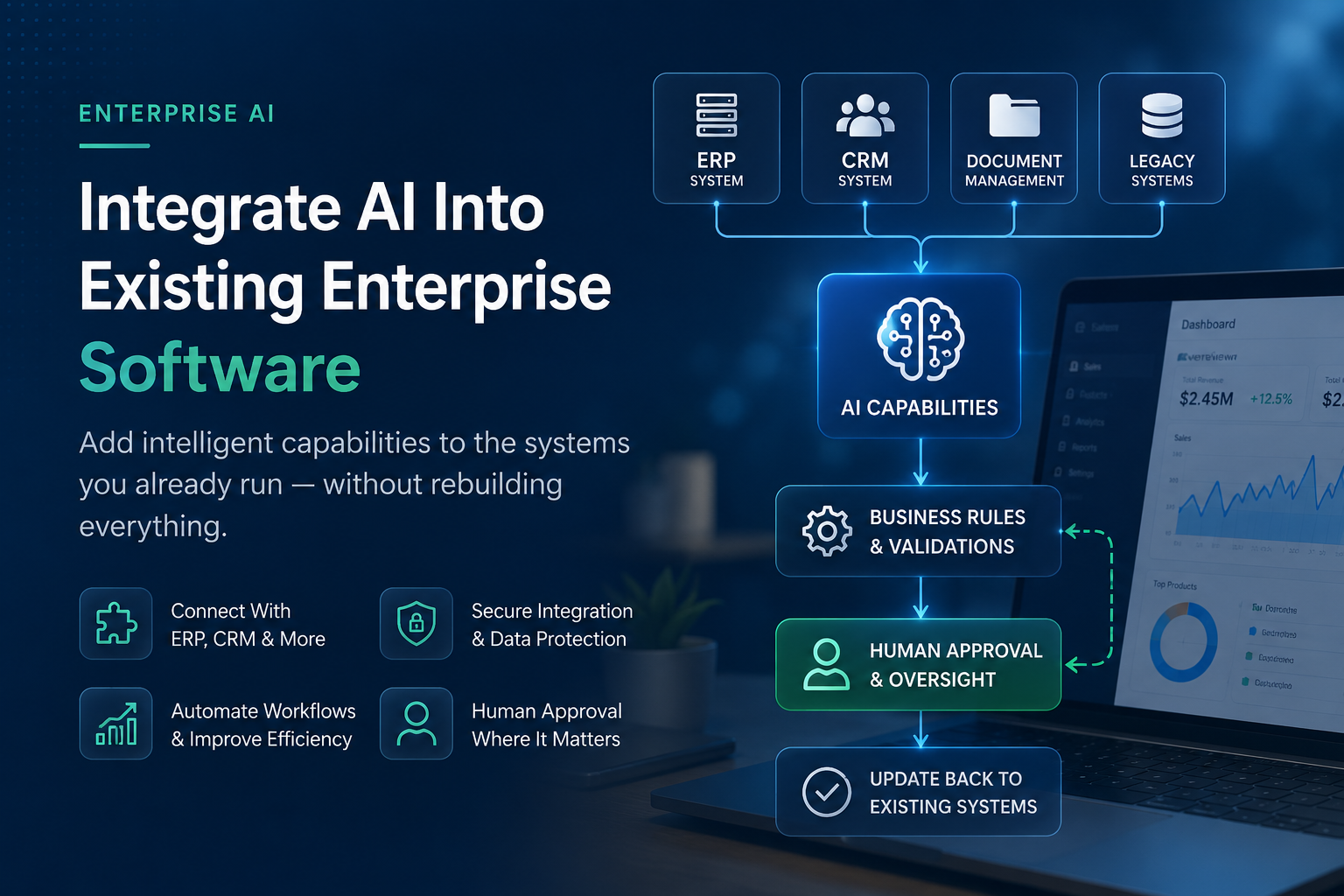
How to Integrate AI Into Existing Enterprise Software Without Rebuilding Everything
There's a common assumption around enterprise AI: adding AI to your business means replacing the software you already use.
Usually, that isn't the first option businesses should consider.
Many enterprises already have ERP, CRM, SaaS platforms and custom systems that perform important business functions. These systems contain years of data, support established workflows and are familiar to employees.
The better question is often not:
“How do we replace our existing software with AI?”
It is:
“Where can AI improve the software and workflows we already have?”
AI capabilities can often be added through controlled integrations without rebuilding the entire platform.
This article explains how AI integration with existing enterprise software works, where it can help, how it connects with existing systems and when modernisation or replacement may genuinely be necessary.
AI modernisation does not automatically mean software replacement.
Why Replacing an Entire Enterprise System Is Often Unnecessary
The systems that run finance, sales, operations and customer management usually perform important functions already.
They may not have modern AI capabilities, but that doesn't necessarily mean the entire system needs to be replaced.
For example, a business may want its existing software to:
- Read incoming documents
- Extract information
- Summarise large amounts of data
- Answer questions from internal knowledge
- Help employees prepare customer responses
- Automate repetitive administrative work
These capabilities can often be added around the existing system.
The organisation keeps its core platform, business data and established workflows while adding new capabilities through APIs and integration layers.
Sometimes replacement is necessary. But it should be a business and technical decision, not an automatic requirement for adopting AI.
How to Identify Workflows Where AI Could Genuinely Help
Before thinking about models or AI platforms, start with the business process.
Look for areas where employees spend significant time:
- Reading similar documents
- Extracting information
- Moving information between systems
- Answering repetitive questions
- Preparing similar responses
- Searching through large amounts of company information
- Summarising reports or case information
These can be good candidates for AI-assisted workflows.
But not every inefficient process needs AI.
If a task has clear rules and structured inputs, traditional automation or an API integration may be cheaper, simpler and more reliable.
The objective should be to improve the workflow — not simply to add AI.
AI Integration Using APIs and Service Layers
APIs are one of the main ways AI capabilities can communicate with existing enterprise software.
An API provides a controlled way for one system to request information or perform approved actions in another.
However, in a well-designed enterprise architecture, an AI model shouldn't necessarily have unrestricted direct access to business systems.
A secure integration or service layer can sit between the AI capability and the enterprise application.
This layer can:
- Control access
- Apply permissions
- Validate information
- Enforce business rules
- Manage integrations
- Record activity
- Determine which actions require human approval
This integration layer is an important part of the engineering behind enterprise AI.
A Simple AI Integration Architecture
A simplified architecture could look like:
Existing Software → Secure API / Integration Layer → AI Capability → Business Rules → Human Approval → Existing System
The AI model is only one part of the complete solution.
A reliable enterprise implementation also needs secure integrations, permissions, business rules, monitoring and appropriate human oversight.
Building an impressive AI demonstration can be relatively straightforward.
Building a secure system that works reliably inside a real business requires much more than the model itself.
Connecting AI With ERP Systems
ERP systems often contain important operational information such as finance, inventory, procurement and orders.
AI capabilities can connect to an ERP through approved APIs to retrieve information and, where appropriate, return approved results.
For example, AI could help:
- Read incoming invoices
- Extract invoice information
- Compare documents with available records
- Summarise operational information
- Identify unusual cases for review
- Help employees search ERP-related information
There should be a clear distinction between AI and deterministic business logic.
Important financial calculations should continue to come from reliable finance or ERP systems.
AI can help interpret, summarise and organise information, but it should not replace the systems responsible for exact financial calculations.
Connecting AI With CRM Systems
CRM systems contain large amounts of customer and sales information.
AI integration can help employees work with this information more efficiently.
For example, AI could:
- Summarise account history before a meeting
- Categorise incoming enquiries
- Prepare follow-up drafts
- Help identify relevant customer information
- Assist with updating approved CRM fields
For important customer communication, organisations should decide where human review is required.
The purpose should be to reduce repetitive administration around customer relationships rather than remove appropriate human involvement.
Connecting AI With Document Management Systems
A significant amount of enterprise knowledge exists in documents.
Contracts, policies, reports, forms and internal documentation often contain information employees need every day.
AI can help search, summarise and extract information from these documents.
However, permissions are essential.
If an employee doesn't have permission to view a document normally, an AI assistant should not give them access to that information either.
Access control needs to be part of the architecture from the beginning.
Connecting AI With Existing Databases and Knowledge Sources
Many organisations also have years of information stored in databases and internal knowledge systems.
AI can potentially use approved information from these sources to answer questions and assist employees.
But the quality of the underlying data matters.
Incomplete, duplicated or inconsistent information can reduce the reliability of an AI-enabled workflow.
In some projects, improving how information is organised and accessed can be just as important as selecting the AI model.
Using AI for Search and Knowledge Retrieval
Internal knowledge search can be a practical starting point for enterprise AI.
Instead of manually searching folders, systems and documents, employees can ask questions using natural language.
A well-designed knowledge assistant should:
- Search only approved information
- Respect existing user permissions
- Provide relevant source references where possible
- Allow employees to verify important answers
Because this type of application mainly helps people find and understand information rather than taking important actions, it can be a practical way to introduce AI while maintaining human control.
Document Processing and Data Extraction
Document-heavy workflows are another practical AI integration opportunity.
Businesses may have employees manually reading:
- Insurance documents
- Contracts
- Applications
- Forms
- Invoices
- Business records
AI can help perform the first stage of information extraction.
A stronger workflow could be:
Document → AI Extraction → Validation Rules → Human Review → Existing Business System
AI performs the initial extraction.
Traditional software validates expected formats and business rules.
A person reviews uncertain or important information before it becomes part of the system of record.
KBA Systems has experience building business platforms with automated invoice-processing and document-workflow capabilities.
The important lesson is that extraction alone isn't enough. Validation, integration and human review are what turn document processing into a usable business workflow.
Customer Service Integration
AI can also work with existing customer-service platforms.
For example, an AI-enabled workflow could:
- Read an incoming customer request
- Identify what the customer needs
- Retrieve relevant approved information
- Prepare a suggested response
- Route the request to the appropriate employee
- Update the support system after approval
Sensitive situations such as complaints, refunds, account changes or unusual customer problems may still require human involvement.
The objective is to reduce repetitive work while allowing customer-service employees to focus on situations requiring judgement and communication.
Workflow Automation Across Multiple Systems
Some of the most useful enterprise automation opportunities involve several systems.
A typical business process might move through:
Email → CRM → ERP → Project Management → Documents → Notifications
Imagine a customer emailing a company to request a change to an existing project.
An AI-enabled workflow could potentially:
- Understand the request
- Identify the relevant customer
- Find the related project
- Prepare a draft task
- Notify the project manager
- Prepare a draft response
- Wait for human approval where required
The important point is that AI isn't doing everything.
AI understands the request. APIs connect the systems. Business rules control the workflow. Humans approve important actions.
This combination is often more useful than simply adding a standalone chatbot.
Human Approval and Business Rules
Two important controls in enterprise AI are business rules and human approval.
Business rules can define:
- Allowed formats
- Required information
- Approval limits
- Validation requirements
- Which systems can be accessed
- Which actions are permitted
Human approval can remain at important points in the workflow.
For example, a person may need to approve before:
- Money is moved
- Important customer communication is sent
- Sensitive information is changed
- A business record is finalised
- A high-impact decision is made
As organisations gain experience with a system, automation can be adjusted based on measured performance and risk.
The level of automation should increase deliberately, not automatically.
Security and Data Privacy
Security should be designed into AI integration from the beginning.
Important considerations include:
Least-privilege access. AI capabilities should only access the systems and information required for the specific workflow.
Understand where data goes. If an external AI provider is involved, organisations should understand how information is processed, retained and protected.
Audit logs. Important actions and outputs should be recorded where appropriate.
Prompt injection protection. AI systems processing external emails, documents or websites need safeguards against untrusted instructions contained within that content.
Monitoring. Organisations should have visibility into what automated workflows are doing.
Override controls. There should be a practical way to stop or override automated processes.
These are not unique AI concepts.
They are good enterprise engineering practices applied to systems that now include AI capabilities.
What If the Legacy System Doesn't Have an API?
Older enterprise software may not provide modern APIs.
That makes integration more difficult, but it doesn't automatically mean the entire platform needs to be replaced.
Depending on the existing architecture, organisations may be able to introduce a service layer that creates a controlled interface between older software and newer applications.
The appropriate method depends heavily on the legacy system, its support status, security requirements and available integration options.
In some cases, partial modernisation may be more practical than either doing nothing or rebuilding everything.
When Is Integration Better Than Rebuilding?
Integration should be seriously considered when:
- The existing system still performs its core job well
- It contains valuable historical data
- Employees understand the current workflow
- The platform can be integrated securely
- The main requirement is adding new capabilities
- A full replacement would create unnecessary disruption
In these situations, integrating AI capabilities may allow the organisation to modernise specific workflows while preserving existing investments.
When Might Rebuilding Actually Be Necessary?
Sometimes rebuilding or replacing software is the better long-term decision.
For example:
- The system is no longer supported
- It creates significant security risk
- Integration options are extremely limited
- The architecture prevents important business changes
- Data structures have become difficult to maintain
- The organisation has outgrown the platform
- Modernisation would cost nearly as much as replacement while preserving major limitations
The decision should be based on the condition of the software and future business requirements.
AI should be one consideration — not the sole reason for replacing a system.
A Practical Phased Implementation Approach
A large enterprise AI programme doesn't need to be the starting point.
A phased approach is often easier to control.
Phase 1 — Identify the Problem
Choose one meaningful, well-understood workflow.
Document how it works today and what improvement would matter.
Phase 2 — Build a Focused Integration
Connect only the systems required for that workflow.
Use secure permissions and maintain human review where appropriate.
Phase 3 — Measure the Result
Compare the new workflow with the original process.
Depending on the project, measure:
- Processing time
- Manual effort
- Error or rework rates
- Employee experience
- Cost per case
- Number of cases requiring human intervention
Phase 4 — Improve and Expand
Use actual results to identify what needs improvement.
Expand automation only when the existing workflow is performing reliably and delivering useful business value.
The goal isn't to introduce AI everywhere.
It is to modernise the parts of the business where AI, automation and better software engineering can make a measurable difference.
Frequently Asked Questions
Do I Need to Replace My ERP or CRM to Add AI?
Not necessarily. AI capabilities can often be integrated into existing ERP, CRM and custom business systems through APIs and secure integration layers. Whether integration or replacement is better depends on the condition and architecture of the existing software.
How Does AI Connect to Existing Enterprise Software?
AI can connect through APIs and integration layers that manage access, permissions, business rules and data exchange. This allows AI capabilities to work with existing software without giving the AI unrestricted access to core systems.
Can AI Be Added to Legacy Systems Without Modern APIs?
Sometimes. Depending on the architecture, a service or integration layer may provide a controlled interface to an older system. The feasibility needs to be assessed individually because legacy platforms vary considerably.
Is It Safe to Connect AI to Business Data?
It can be when appropriate security controls are implemented. These may include restricted permissions, secure integrations, audit logs, data-handling policies, monitoring, prompt-injection safeguards and human approval for important actions.
When Is Rebuilding Better Than Integrating AI?
Replacement may make sense when existing software is unsupported, insecure, extremely difficult to integrate, unable to meet future business requirements or already due for major modernisation independently of AI.
Thinking About Adding AI to Existing Software?
You may not need to rebuild everything.
KBA Systems can review your existing software, workflows and integration options to identify where AI can realistically be added, where traditional automation makes more sense and where deeper software modernisation may be justified.

Stop Building Apps. Start Architecting Intelligent Systems.
Whether you need to modernize legacy infrastructure or build custom AI agents from scratch, our elite engineering pods are ready to design your competitive edge. Let’s map out your transition.
